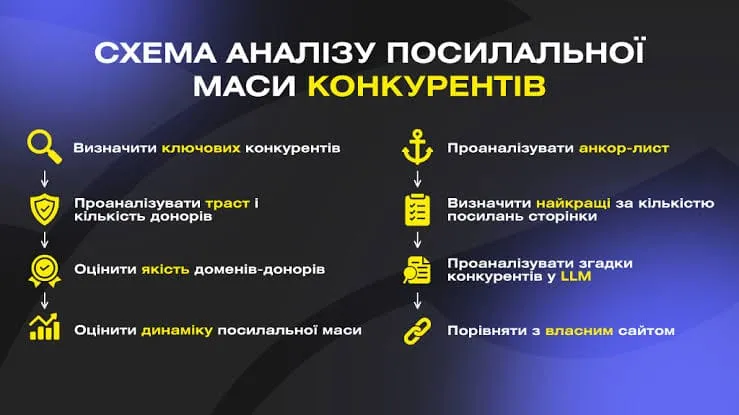

Competitor backlink analysis means exporting their backlinks, weeding out junk domains and selecting the donors you can actually get access to. The goal is not to copy someone else’s profile in full but to find sites that already link to sites in your niche and get placed there too. The whole process has three steps: export → filter → select accessible donors.
Key points in 30 seconds
- Analyze 3–5 competitors from the live top 10 for your keywords, not just one.
- The profile export is only raw material: filtering removes 70–90% of domains.
- A donor is valuable only if it is live and you have real access to it: crowd, outreach, directory or niche edit.
- Domains that link to several competitors at once are your top priority.
- The output is not a list of a thousand URLs but a short worksheet of accessible donors with priorities.
Why analyze competitor donors instead of collecting links at random
Competitors in the top have already passed the search engine’s selection: their link profile works. By breaking down where they get links, you save months of searching for sites on your own and immediately see the real bar: how many donors of what quality you need to compete. Use that as the starting point for both strategy and budget: once you understand the gap between your profile and the leader’s, it is much easier to plan purchases without overpaying. Keep in mind that some of a competitor’s links come from private outreach or paid placements; you can see them in the export, but you can’t always reproduce them one to one, so the analysis gives you a benchmark, not a ready list to copy. We cover the calculation method in detail in our article on how many links you need to rank in the top.
Why benchmark against competitor links at all? Google explicitly lists link analysis systems and PageRank among its ranking systems. Industry studies show the same picture from another angle: after analyzing 11.8 million Google search results, Backlinko found that the page in position 1 has, on average, 3.8 times more backlinks than pages in positions 2–10. And the Ahrefs search traffic study shows a clear correlation between the number of referring domains and a page’s traffic. Correlation is not causation (ice cream sales and sunburns rise together too, and summer is to blame), but it explains why the donor gap between you and the leader is worth measuring rather than guessing.


Step 0. Find your real competitors in the search results
The most common mistake happens before the export even starts: people analyze their “business competitors” instead of the sites that actually rank. Your offline rival may not do any SEO at all, while the top results for your queries are held by information portals, aggregators or a small niche store you have never heard of. The rival you’ve been fighting at trade shows for years may not even show up in Google.
- Take 10–20 keywords you want to grow for: commercial ones for service and category pages, informational ones for the blog.
- Check Google’s top 10 in your target region and language (for Ukraine, with the Ukrainian interface) and write down the domains that keep appearing.
- Drop marketplaces, Wikipedia, YouTube and major media: their profiles are not comparable to yours and can’t be replicated.
- Keep the 3–5 domains that appear most often and are close to you in site type and size.
One more thing: analyze competitors separately for each page type. The sites competing with your homepage for a commercial query and those competing with your blog post for an informational one are often different sites with very different profiles.
Step 1. Export competitor link profiles
Start by choosing competitors. Skip big brands and aggregators (their profiles are out of reach and irrelevant) and take 3–5 sites that consistently hold top-10 positions for your target queries and are comparable to you in size. They show the achievable bar.
Next, export their backlinks. The minimum set of fields for each link:
- donor domain and the specific page URL;
- anchor text and link type (dofollow / nofollow);
- donor trust metric: DR, DA or Trust Flow;
- site topic and the date the link appeared.
Export each competitor separately, then merge everything into one file. At this stage completeness matters more than trust: collect everything, clean up later. Think of it as moving house: everything goes into boxes first, and you sort it out at the new place.
Look not only at the competitor’s domain as a whole but also at the specific pages that rank for your queries. A domain may have thousands of links pointing to its homepage, while the category page you compete with holds its top position with almost no external links, relying on internal linking and content. In that case you don’t need “the same profile” but a strong page plus a moderate number of topical links.
Step 2. Filtering: cutting out the junk
70–90% of a raw export is domains you don’t need. First collapse links to the domain level (referring domains): hundreds of links from one site don’t make it many times more valuable. Then remove:
- dead domains and pages that return errors;
- obvious spam: PBN footprints, link farms, high spam scores;
- irrelevant topics (adult, gambling, doorways), unless that is your niche;
- duplicates and link aggregators that link to everyone indiscriminately.
We explain how to tell a live, quality domain from an empty shell using 12 criteria in a separate guide on how to check site trust and choose a donor. Don’t throw out nofollow links automatically: the profile needs them to look natural, so just mark them separately. For what a healthy profile looks like overall, see what a link profile is.
Take a separate look at links that resemble automated blasts, networks or mass-produced articles with exact-match anchors. The fact that a top-ranking competitor has them doesn’t make them safe: Google’s link spam policy covers buying links for ranking purposes, excessive link exchanges, automated programs that create links, and large-scale guest posting campaigns with keyword-rich anchors. Some of these links may no longer work for the competitor at all and simply linger in the export.
Step 3. Link intersect and gap: donors your competitors have and you don’t
After cleaning, build a matrix: rows are donor domains, columns are your site and each competitor. This gives you the two most useful views:
- Link intersect: domains that link to two or more competitors. These sites are clearly open to your topic, and your chances of getting placed there are the highest.
- Backlink gap: domains that link to competitors but not to you. This is your list of opportunities.
Major tools have these reports built in: Backlink Gap in Semrush, Link Intersect in Ahrefs. Semrush’s guide on how to find competitor backlinks walks through working with these reports step by step. The logic is always the same: identify the competitors in the SERP, compare profiles and pick the domains that link to them but not to you. Without a paid tool you can build the same matrix manually in a spreadsheet from free exports; it just takes longer.
Step 4. Classify links by type
Sort the gap donors by type: this shows how the competitor’s profile is built and what it rests on.
| Type | What it means in a competitor’s profile | Can you replicate it |
| Forums, Q&A, discussions | Community activity, crowd marketing | Yes, if the site is live and moderators allow relevant links |
| Directories, listings, maps | Basic brand presence | Usually yes, on your own |
| Guest and sponsored articles | Outreach or paid placements | Partly, by agreement with the owner |
| Media mentions, reviews | PR, expert comments, newsworthy events | Hard, you need your own news hook |
| Partners, suppliers, clients | Business relationships | Only if you have similar relationships |
| Networks, link blasts, junk | Manipulative tactics | Not worth it |
For more on the different kinds of links, see our article on types of backlinks.
Step 5. Anchors and link velocity
Two metrics that are often skipped, even though they say the most about risk.
Anchors
Look at each competitor’s anchor distribution: branded, naked URL, generic (“here”, “website”; a “click here” anchor is honest enough, but Google never does find out what exactly is “here”), partial match and exact-match commercial. Ahrefs’ guide to anchor text covers the anchor types and their role well; in our experience, you should aim for the natural distribution in your niche rather than a universal “formula”. If most of the leader’s anchors are branded or naked URLs while yours are exact match, the problem is not the number of links. You can calculate the shares for your own profile with our anchor text analyzer, and the anchor text generator helps you put together a balanced list.
Link velocity
A chart of new referring domains by month shows how a competitor built its profile: steadily or in waves. A steady gain of a few domains every month over several years is a safe benchmark for your own pace. Sharp spikes followed by a drop in visibility, on the other hand, show what not to repeat. Read more about a safe pace in our article on whether a sudden spike in links is harmful.
Step 6. Selecting accessible donors
Sort the remaining domains by access method. This is what turns the analysis into an action plan:
- crowd sites: forums, Q&A services, reviews, comments, almost always accessible;
- outreach and guest posts: an agreement with the owner, usually paid;
- directories and listings: simple self-placement;
- niche edits: inserting a link into an existing article on the donor site.
Set priorities on four parameters: topical relevance, trust, accessibility and price. Separately flag overlap domains: those that link to two or three competitors at once. If a site links to several players in the niche, you will most likely be able to get placed there too, and such a donor is almost always safer than a random one. Don’t bet on a single donor type: a profile made only of crowd links looks just as unnatural as one made only of expensive articles; a healthy mix combines formats.
Before adding a donor to the plan, check its current state: the competitor’s link may have appeared three years ago, and the site may have gone downhill since. A forum whose newest post still wishes everyone a happy New Year from two years back isn’t a donor anymore; it’s a heritage site. Our free donor site checker quickly shows the basic metrics; then open the page with the competitor’s link and see whether the section is alive, when the last posts were published and whether registration is open.
From our practice
Competitors’ forum donors look like the most accessible ones, but far from all of them can be replicated. According to our check of 16.5 thousand forums in October 2026, among the 9,926 forums where we could verify registration, it was open on only 39%, another 14% required accepting the rules, 3% were closed, and for 44% the check ended with an error or an unclear status. Among the forums where we could check threads, 68% had no external links at all in the threads checked. So when you see 40 forums in a competitor’s export, realistically expect a much smaller share to work for you. That is exactly why we work from our own verified list of live sites rather than from other people’s exports.
Free and paid tools
Free services give a limited slice of the profile, which is enough to estimate the scale and find obvious donors. Paid tools give the full picture, deep filtering and a link intersect report. We have compiled services with free limits in our review of free SEO tools.
| Tool | Access | What it gives | Limitations |
| Google Search + operators | Free | Manual search for sites and mentions | Slow, no metrics |
| Ahrefs (Free Checker / Webmaster Tools) | Free, with limits | Top backlinks, part of the profile | Truncated export |
| Ubersuggest and similar checkers | Free, with limits | Quick snapshot of donors | Little data, query limits |
| Ahrefs / Semrush (full) | Paid | Full profile, filters, link intersect | Subscription cost |
| Serpstat / Majestic | Paid | Profile, Trust Flow, comparison | Subscription cost |
Remember that no tool sees every link, and their metrics (DR, DA, Trust Flow) are not Google metrics. Moz, for example, states plainly that Domain Authority is not a Google ranking factor and has no effect on the SERPs. Use these numbers to compare domains with each other, not as an estimate of “how much weight a link will pass”.
A ready-made worksheet
The end result of the analysis is a working spreadsheet, not an export with thousands of rows that nobody will ever open twice. The minimum set of columns:
- donor domain and URL;
- trust metric (DR / DA);
- topic and relevance;
- access method (crowd / outreach / directory / niche edit);
- how many competitors it links to;
- approximate price and priority (1–3);
- status (in progress / placed).
Here is what it might look like in practice (the domains are placeholders):
| Donor | Type / access | Topic | Competitors | Condition | Priority | Status |
| forum-auto.example | Forum / crowd | Direct | 3 of 4 | Live, registration open | 1 | In progress |
| directory.example | Directory / self-placement | Adjacent | 4 of 4 | Live | 1 | Placed |
| blog-media.example | Article / outreach | Direct | 2 of 4 | Live, accepts guest posts | 2 | Request sent |
| old-forum.example | Forum / crowd | Direct | 2 of 4 | Last post a year ago | None | Rejected |
| links-list.example | Aggregator | None | 4 of 4 | Spam | None | Rejected |
This file immediately becomes your purchasing plan: accessible, high-trust overlap domains at the top, optional ones below. To build a full campaign from it, read our core guide on what link building is.
How to turn the analysis into a plan
The donor worksheet answers the question “where”, but a plan also has to answer “how many”, “at what pace” and “to which pages”.
- Measure the gap. Compare your number of unique referring domains with the median across 3–5 competitors for each target page. It is a benchmark, not a quota: quality and relevance matter more than the number.
- Distribute by page. Plan links to the homepage, categories, services and articles separately, based on where competitors’ donors point.
- Set the pace. Spread closing the gap over several months, following the leader’s growth rate rather than your “here and now” budget.
- Mix formats. Crowd links and forums provide a natural base and domain diversity, directories cover basic presence, and articles and PR bring strong topical links.
- Add what competitors don’t have. Copying other people’s links at best lets you catch up with a competitor; to overtake them, you need your own link sources: useful content, research, tools. You’ll find ideas for such channels in Ahrefs’ link building guide for beginners.
- Re-check every quarter. Competitor profiles change: repeat the gap analysis and update your priorities.
You can lay the gap out as a monthly schedule in our link building plan, and the link budget calculator will estimate the cost.
From our practice
When analyzing Ukrainian niches, we regularly see that competitors have few Ukrainian-language forum donors. The reason is simple: there aren’t many of them in the first place. According to our check of 16.5 thousand forums in October 2026, among live sites 72% are Russian-language, 16% English-language, only 10% (1,420) purely Ukrainian-language, and another 3% (399) mixed Ukrainian-Russian. Together, forums with Ukrainian content make up 1,819 of 14,869 live forums, or about 12%. That’s why a plan for a Ukrainian-language site can’t fully mirror a competitor’s profile: we pick topical Ukrainian sites where they exist and are upfront when a niche has too few of them.
Common mistakes
- Copying a competitor’s profile one to one: you will repeat both their junk and their over-optimization.
- Chasing trust at the expense of relevance: a topical link from a mid-level domain outweighs a random link from a strong one.
- Analyzing just one competitor: the sample isn’t representative, so take several.
- Counting links instead of domains: 1,000 links from 10 sites are weaker than 100 links from 100 sites.
- Analyzing “business competitors” instead of the sites that actually rank for your queries.
- Ignoring a competitor’s anchors and pace: a domain count without context doesn’t show how they actually got to the top.
The analysis shows where to get links, but the placement itself is separate, labor-intensive work: negotiations, copy, indexing checks. If you want to go straight from the spreadsheet to results, you can delegate this part: we will pick donors for your niche and place links manually as part of our link building services, and for forums and live discussions there is crowd link placement.
Send us the domains of two or three competitors: we will analyze their profiles, identify accessible donors and propose a placement plan for your niche and budget. Discuss your project.
Sources
- Semrush: How to Find Competitor Backlinks: finding and comparing competitor profiles
- Ahrefs: Link Building for Beginners
- Ahrefs: Anchor Text
- Backlinko: We Analyzed 11.8 Million Google Search Results
- Ahrefs: Search Traffic Study: correlation between referring domains and traffic
- Google Search Central: A guide to Google Search ranking systems
- Google Search Central: Spam policies for Google web search
- Moz: Domain Authority